

Salesforce Marketing Cloud
Salesforce Marketing Cloud is a digital marketing platform that helps businesses automate and manage their marketing efforts across various channels, such as email, social media and mobile apps. It allows organizations to deliver personalized messages and analyze customer interactions to improve marketing strategies.
Before setting up
Before you can connect, you need to have an active Salesforce Marketing Cloud account.
Follow this guide to create an installed package. to create an Installed Package.
While creating the package, make sure the following permissions are enabled:
- Assets (Read, Write)
- Saved Content (Read, Write)
Once the package is created, copy the following values:
Client IDClient Secret- Domain name (only the subdomain part). Example: https://mc-123abc456def.auth.marketingcloudapis.com/. Your subdomain is
mc-123abc456def.
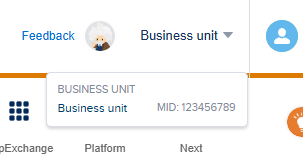
To retrieve the Member ID, click your username in the top-right corner of the navigation bar and copy the MID value.
Connecting
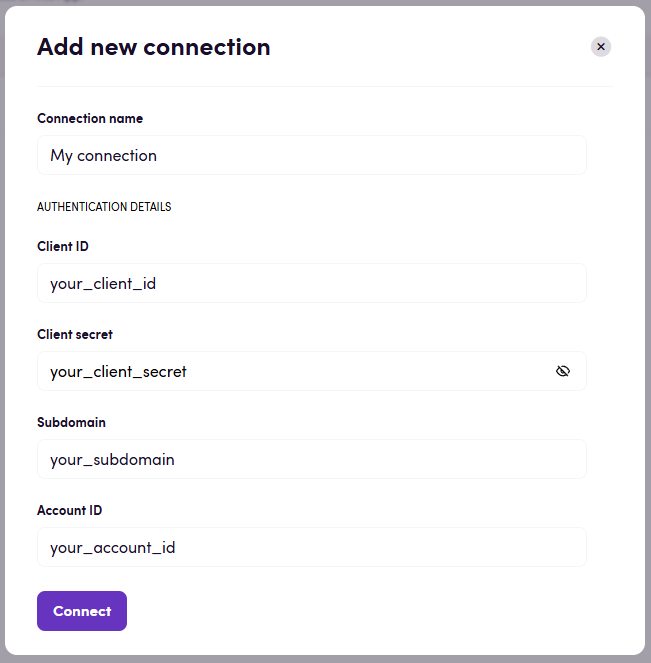
- Name your connection for future reference e.g. ‘My organization’.
- Paste the credentials you obtained earlier.
- Click Authorize connection and wait for the process to complete.
- Confirm that the connection has appeared and its status is Connected.
Actions
Content
- Search content. Search content (emails and content blocks) with specific criteria.
- Get content ID from a file. Get content ID from file metadata.
Emails
- Get email details. Get details of a specific email.
- Download email. Download email content.
- Update email. Update existing email from file.
- Create new email. Create new email from file.
- Find email. Find email ID using its name.
Content blocks
- Download content block. Download content block content.
- Create content block. Create a new content block.
Events
Content
- On content created or updated
Feedback
Do you want to use this app or do you have feedback on our implementation? Reach out to us using the established channels or create an issue.