

Microsoft 365 Email (Outlook)
Microsoft 365 Email is a personal information manager software system that allows users to manage their emails.
Before setting up
Section titled “Before setting up”Before you can connect you need to make sure that you have a Microsoft 365 account.
Azure app
Section titled “Azure app”If you want to use a custom Azure application for authorization, you should do the following:
- Go to Azure > App registrations > New registration.
- Enter the name of your application and choose the supported account types. Click Register.
- Go to Manage > API permissions and select the required scopes:
- If you only need to send emails, select the following permissions: User.Read, Mail.Send, offline_access
- If you want to be able to fully use this Outlook app, select the following permissions: User.Read, Calendars.ReadWrite, Contacts.ReadWrite, Mail.ReadWrite, Mail.Send, Mail.ReadWrite.Shared, MailboxSettings.Read, offline_access
- Go to Manage > Authentication and click Add a platform. Choose Web and enter this redirect URI: https://bridge.blackbird.io/api/AuthorizationCode
- Go to Manage > Certificates & secrets and click New client secret. Enter a description (optional) and set the expiration time. Copy the created secret value, as you won’t be able to see it again.
- Go to Overview and copy the Application (client) ID and Directory (tenant) ID. Use these values to register your connection in Blackbird.
Connecting
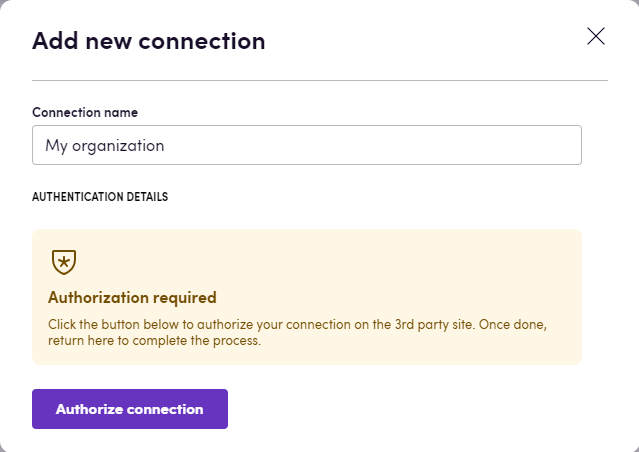
Section titled “Connecting”Navigate to apps and search for Microsoft 365 Email, click Add Connection, name your connection for future reference and select the connection type you want to use.
- Click Authorize connection.
- Follow the instructions that Microsoft gives you, authorizing Blackbird.io to act on your behalf.
- When you return to Blackbird, confirm that the connection has appeared and the status is Connected.
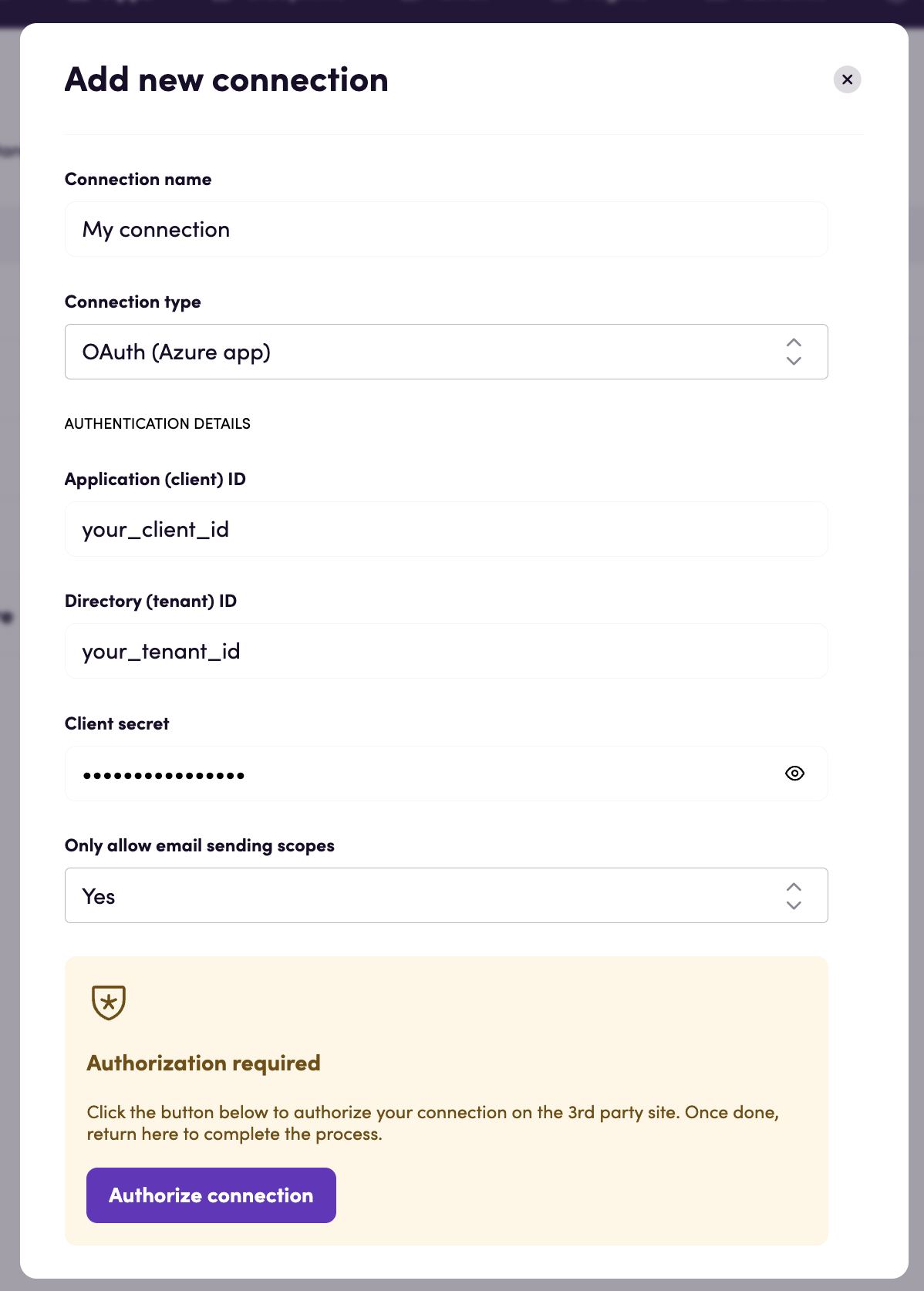
OAuth (Azure app)
Section titled “OAuth (Azure app)”- Under Only allow email sending scopes specify Yes if you want to only send emails using this app.
- Enter the Application (client) ID, Directory (tenant) ID and Client secret obtained from your custom Azure app.
- Follow the instructions that Microsoft gives you, authorizing Blackbird.io to act on your behalf.
- When you return to Blackbird, confirm that the connection has appeared and the status is Connected.
Actions
Section titled “Actions”- List most recent messages returns messages received during past hours. If number of hours is not specified, messages received during past 24 hours are listed. To retrieve messages from specific mail folder (e.g. inbox), specify the respective parameter.
- Get message retrieves specific email from your mailbox.
- List attached files retrieves a list of files attached to a message.
- List mail folders.
- Create draft message creates a draft of a new message. This action is useful when you need to make updates to your email later in the flow (for example, adding attachments in a loop) or when you need it to be reviewed by person later.
- Attach file to draft message.
- Update draft message subject.
- Update draft message body.
- Add category to message adds a category to a message while preserving its existing categories.
- Add recipients to draft message adds one or more email recipients to an existing recipients list of a draft message.
- Remove recipients from draft message removes one or more email recipients from an existing recipients list of a draft message.
- Send draft message.
- Send new message creates a new message and send it in one action.
- Forward message.
- Reply to a message.
- Delete message deletes sent or draft message.
Events
Section titled “Events”- On email created is triggered when a new email is created in specified mail folder.
- On email updated is triggered when an email is updated in specified mail folder.
- On emails received is triggered when a new emails are received in inbox folder.
- On emails with files attached received is triggered when emails with file attachments are received in inbox folder.
Example
Section titled “Example”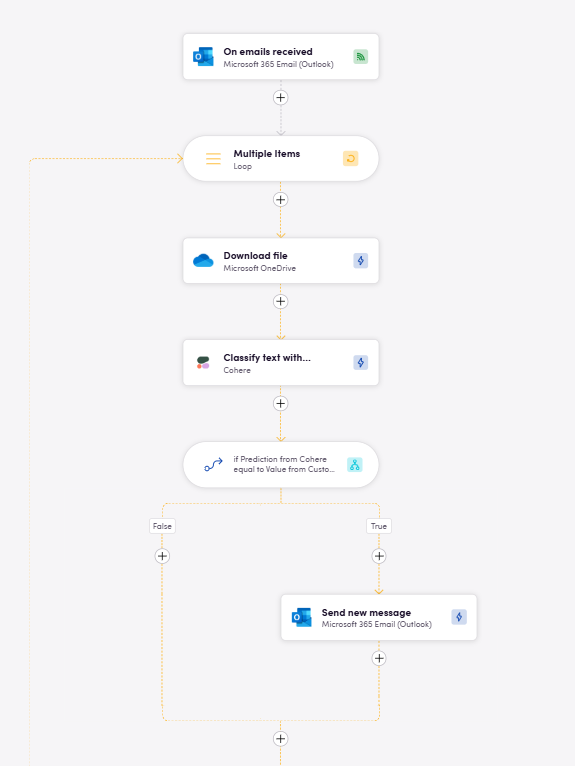
Here, whenever an email is received we perform email content classification using one of Cohere’s models and then, based on its prediction, forward the message to a specific customer support specialist.