

Drupal
Drupal integration uses Translation Management Tool (TMGMT) jobs. Unlike CMS integrations that watch page changes, this app receives translation jobs already assembled by TMGMT. One job can contain fields from one or more pages or other Drupal content items.
TMGMT Blackbird module
Section titled “TMGMT Blackbird module”Install and configure the TMGMT Blackbird module on your Drupal site. The module exposes translation jobs to Blackbird and receives translated job content.
Requirements
Section titled “Requirements”The module requires Translation Management Tool (TMGMT).
Installation
Section titled “Installation”Install the module as a contributed Drupal module. See Installing contributed modules for Drupal instructions.
Configuration
Section titled “Configuration”Go to /admin/tmgmt/translators and configure the Blackbird translator.
- Copy the translator API key. The same key is required when creating the Blackbird connection.
- Enable Auto accept finished translations if completed translations should be accepted without manual review.
Translation workflow
Section titled “Translation workflow”A TMGMT job is the content unit used by blueprint actions. Its Job ID becomes the unique content ID, and its target language becomes the content variant.
- Create a TMGMT translation job in Drupal and select Blackbird translator.
- Start the bird with On translation jobs requested. Requested jobs remain unprocessed until Blackbird accepts them.
- Pass the Job ID from the event to Download job content. Download accepts job by default after file reaches file manager.
- Translate the downloaded content.
- Pass the translated content and job target language to Upload job content.
For multi-language checkout, select all target languages in Drupal and leave Submit all translation jobs to Blackbird checked. One submission creates one unprocessed TMGMT job per target language; event outputs every matching job for workflow processing.
Connecting
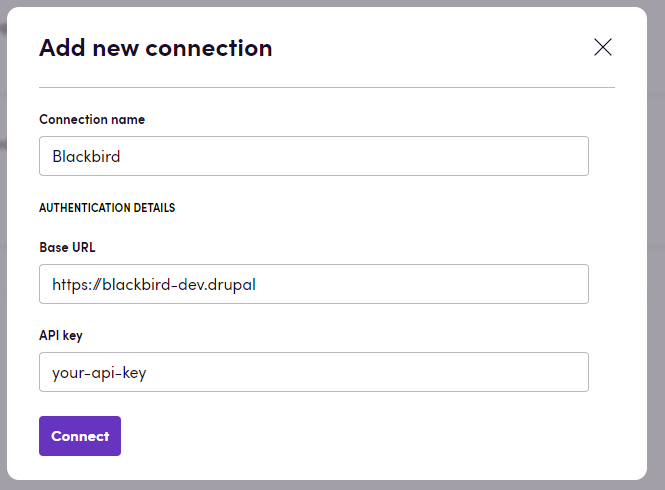
Section titled “Connecting”- Open Apps, search for Drupal, and select Add connection.
- Enter a connection name.
- Enter Drupal Base URL, for example
https://drupal.example.com. - Enter the API key copied from the Blackbird translator configuration.
- Select Connect and verify that the connection succeeds.
Actions
Section titled “Actions”- Search jobs: Search translation jobs using optional filters. Without state, returns unprocessed jobs awaiting acceptance.
Advanced settings:
- State: Filter jobs by unprocessed, active, rejected, completed, or aborted state. Defaults to unprocessed jobs.
- Target language: Filter jobs by target language.
- Created after: Filter jobs created on or after the selected date and time.
- Note contains: Filter jobs whose provider note contains supplied text, regardless of case.
- Download job content: Download assembled content from a translation job.
Advanced settings:
- File format: Select
Originalto download content without interoperability metadata. Default output includes metadata and stable field keys needed for content roundtrip. - Accept job: Accept job after downloaded file reaches file manager. Defaults to
true. - Note: Set optional provider note after downloaded file reaches file manager. Maximum 255 characters; empty string clears existing note.
- File format: Select
- Upload job content: Upload translated content to a translation job and output content with updated target metadata. Content and Target language are required. Target language must match the job configuration. Supports content produced from HTML, XLIFF 1, or XLIFF 2 workflows.
Advanced settings:
- Job ID: Override the Job ID embedded in the content. Leave empty when the content still contains its original Job ID.
- Accept job: Accept unprocessed translation job and move it to active state. Repeated requests for active job are idempotent.
- Get job note: Get provider note shown under Provider information on translation job page.
- Set job note: Set provider note shown under Provider information. Maximum 255 characters; empty string clears note.
- Reject job: Reject active translation job and record supplied reason in Drupal. Repeated rejection requests for same rejected job are idempotent.
Events
Section titled “Events”Translation jobs
Section titled “Translation jobs”- On translation jobs requested: Triggered when translation jobs are requested and outputs their metadata.
Advanced settings:
- Target languages: Trigger only for jobs with selected target languages.
- On job statuses changed: Triggered when translation job statuses change or new unprocessed jobs appear, and outputs previous and current statuses. Statuses is required; select unprocessed, active, rejected, completed, or aborted.
Advanced settings:
- Job ID: Trigger only for selected job.
- Job label contains: Trigger only when job label contains supplied text.
Error handling
Section titled “Error handling”Errors include the status code and message returned by Drupal where available. Confirm the Job ID, target language, API key, and connection Base URL before retrying.
Example error message: Status code: 404, Error: Page not found | Blackbird Demo
Feedback
Section titled “Feedback”Share feedback through Blackbird support channels or create an issue in this repository.