

Akeneo
Akeneo’s PIM (Product Information Management) solution is designed to ingest, normalize, enrich, and centralize product information. It provides enterprise-grade data modeling, governance, and workflows to ensure consistent and high-quality product data management across various channels.
Before settings up
Section titled “Before settings up”Before you can connect you need to make sure that:
- You have an active Akeneo instance and you have sufficient rights to add apps to it.
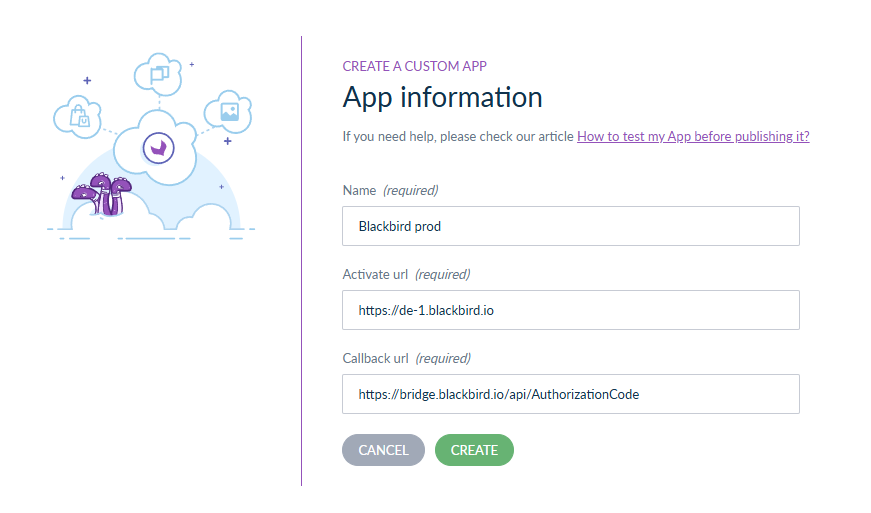
- Go to Connect -> App Store and click on Create an app in the top right corner.
- Give your app a name, for example “Blackbird”.
- The activate URL is irrelevant for Blackbird, you can give it the Blackbird login URL like
https://de-1.blackbird.io. - For the callback URL fill in
https://bridge.blackbird.io/api/AuthorizationCode. - You will receive a
Client IDand aClient Secret. Copy and save these values for the next steps.
Connecting
Section titled “Connecting”- Navigate to Apps, and identify the Akeneo app. You can use search to find it.
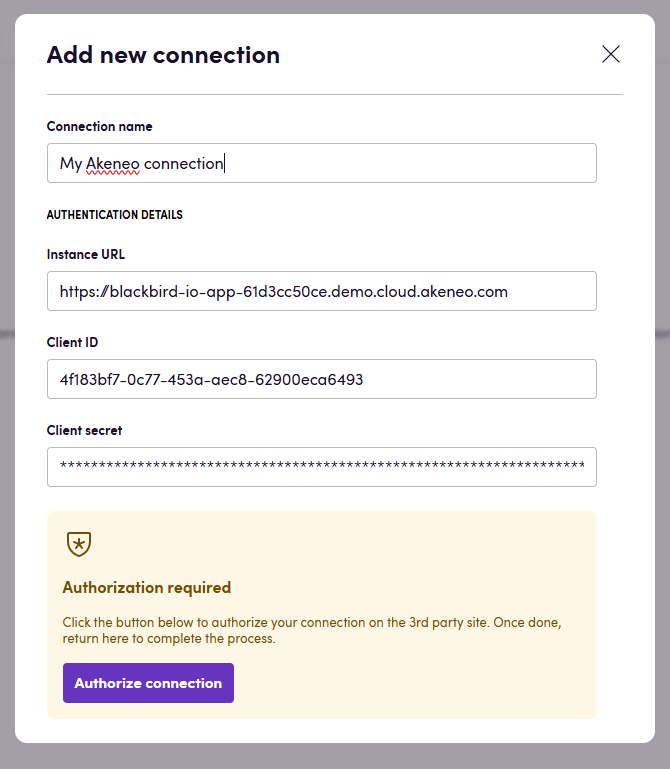
- Click Add Connection.
- Name your connection for future reference e.g. ‘My Akeneo connection’.
- Fill the
Instance URLfield with the url of your Akeneo instance. - Fill in the
Client IDandClient Secretyou copied from Akeneo in the previous section. - Click Authorize connection and go through the authentication flow in the popup window.
- Agree to the privacy policy.
- Select the Own level, Edit for locales and Edit for attribute groups.
- Confirm the connection
- When you return to Blackbird, confirm that the connection has appeared and the status is Connected.
Actions
Section titled “Actions”Content
Section titled “Content”- Search content return a list of different types of content.
- Download content downloads content to a file.
- Upload content upload content from a file.
Note: These actions support products and product models.
Locales
Section titled “Locales”- Get all locales returns a list of locale codes that are available on this Akeneo instance. Note: Akeneo does not have a default locale.
Attributes
Section titled “Attributes”- Search attributes returns a list of attributes.
- Get attribute returns an attribute by its code.
- Create attribute creates an attribute.
- Update attribute updates an existing attribute.
- Search attribute options returns a list of attribute options.
- Get attribute option returns an attribute option by attribute code.
- Create attribute option createa an attribute option.
- Update attribute option updates an existing attribute option.
Categories
Section titled “Categories”- Search categories returns a list of categories.
- Get category returns a category by its code.
- Create category creates a category.
- Update category updates an existing category.
Products
Section titled “Products”- Search products returns a list of products based on filter criteria, for example product name, categories and updated date.
- Delete product deletes a specific product.
- Get product info returns details about a specific product.
- Update product info updates details of a specific product.
- Download product content downloads product content to a file.
- Upload product content uploads product content from a file.
Product models
Section titled “Product models”- Search product models returns a list of product models based on filter criteria, for example code, categories and updated date.
- Delete product model deletes a specific product model.
- Get product model info returns details about a specific product model.
- Update product model info updates details of a specific product model.
- Download product model content downloads product model content to a file.
- Upload product model content uploads product model content values from a provided file.
All products and product models return information about categories. You can use this to make detailed decisions on localization strategies.
Events
Section titled “Events”Content
Section titled “Content”- On content created or updated triggers whenever a content of an existing item is updated or a new item with content is created.
- On content created triggers whenever new content is created.
Note: These events only support products and product models.
Products
Section titled “Products”- On product content created or updated triggers whenever an existing product content is updated or a new product with content is created.
Product models
Section titled “Product models”- On product model content created or updated triggers whenever an existing product model content is updated or a new product model with content is created.
Example
Section titled “Example”The above example shows a very simple manually triggered bird that translates certain products using DeepL.
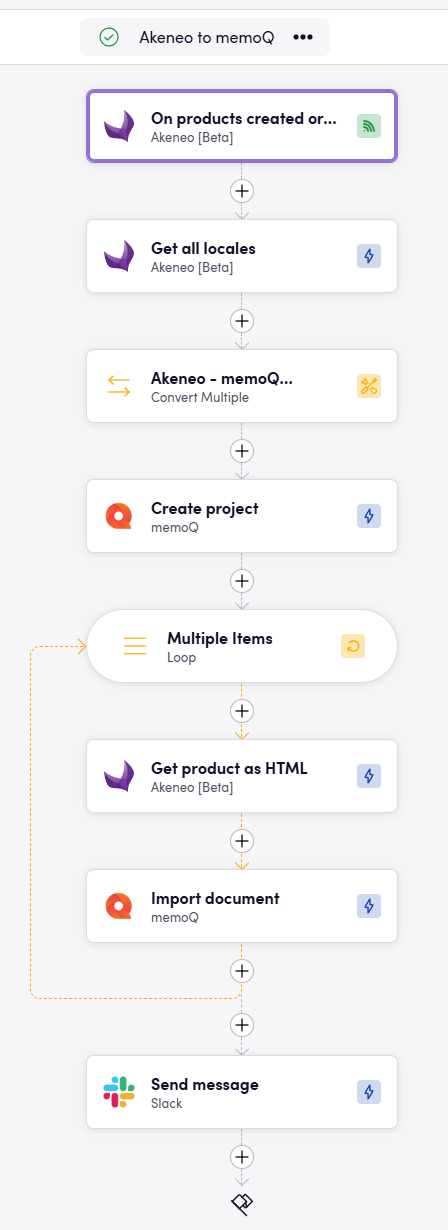
In the above example we respond to new products being updated or created, creating new memoQ projects for them and uploading the translatable files to memoQ.
Missing features
Section titled “Missing features”Akeneo is a huge app with a lot of features. If any of these features are particularly interesting to you, let us know!
In particular we can offer localization capabilities for other aspects of Akeneo like Categories.
Feedback
Section titled “Feedback”Do you want to use this app or do you have feedback on our implementation? Reach out to us using the established channels or create an issue.