

Blackbird Service API
This is the Blackbird Service API app for Blackbird. We can hear you thinking, isn’t that a bit too Blackbird-ception? On the contrary! With the Blackbird Service API app you can orchestrate workflows that involve Blackbird itself. Common use cases are Flight logging, error handling and user management.
With the Blackbird app you can connect to any Blackbird instance independent of hosted environment or organization. This means that you are not limited to your own organization.
Before setting up
Section titled “Before setting up”Before you can connect you need to make sure that:
- You have admin privileges on the Blackbird instance you want to connect to.
Obtaining an API key
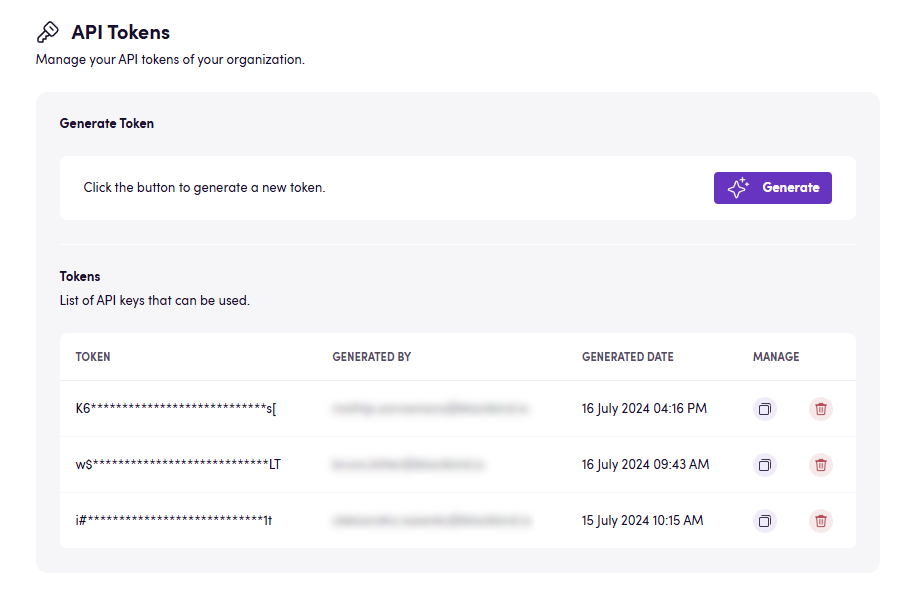
Section titled “Obtaining an API key”- While logged in to your Blackbird organization, click on the user icon on the top right and select Organization management.
- Click on API Tokens in the panel on your left.
- Click Generate
- Copy the token that you just generated by clicking on the copy button under Manage.
Connecting
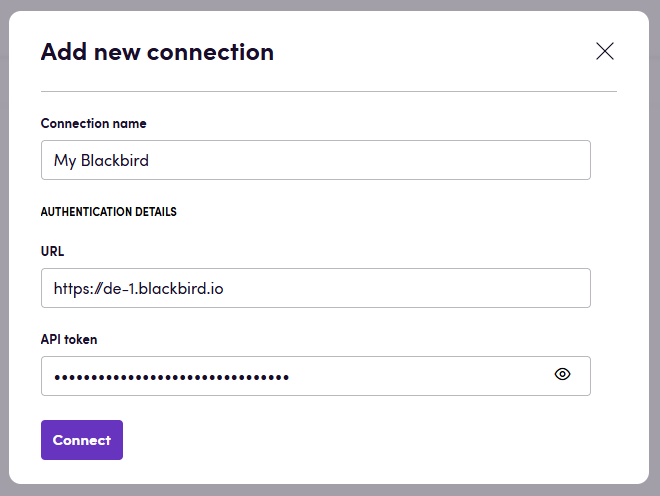
Section titled “Connecting”- Navigate to apps and search for Blackbird. Select the Blackbird app.
- Click Add connection
- Give your connection a name.
- Under Instance, select which instance of Blackbird you are using, for example Europe (eu-1) (https://eu-1.blackbird.io).
- Under API token, fill in the API token you have just created.
- Click Connect.
Actions
Section titled “Actions”- Search notifications Gets the latest notifications across all nests
- Search users Searches all users
- Get user Gets details about a specific user
- Search nests Searches all nests
- Get nest Gets details about a specific nest
- Update user in nest Adds a user to a specific nest
- Delete user from nest Removes a user from a specific nest
- Search birds Searches for birds in a specific nest
Advanced settings:
- Trigger type: Filter birds by trigger type.
- Status: Filter birds by status.
- Get bird Gets details about a specific bird
- Search bird logs Gets logs for a specific bird
- Fly bird Starts a flight for a published bird with a manual trigger
Flights
Section titled “Flights”- Search Flights Searches for flights belonging to a specific bird
Advanced settings:
- Minimum start date: Filter flights that started on or after this date.
- Maximum start date: Filter flights that started on or before this date.
- Search other active flights Checks whether the current bird has other active flights and outputs their IDs
- Get Flight Gets details about a specific flight
- Get Flight Logs Gets logs for a specific flight
Events
Section titled “Events”- On Bird activated On a bird being activated
- On Bird published On a bird being published
- On Bird suspended On a bird being suspended
Flights
Section titled “Flights”- On Flight started On a flight being started
Advanced settings:
- Nest ID: Limit events to flights in a specific nest.
- Bird IDs: Limit events to specific birds.
- Bird status: Limit events to flights whose birds have a specific status.
- On Flight succeeded On a flight succeeding
- On Flight failed On a flight failing
- On Nest created On a nest being created
- On Nest deleted On a nest being deleted
- On user added to Nest On a user being added to a nest
- On user removed from Nest On a user being removed from a nest
Notifications
Section titled “Notifications”- On Notification received On a notification being received
Advanced settings:
- Notification type: Limit events to a specific notification type.
Examples
Section titled “Examples”Error handling
Section titled “Error handling”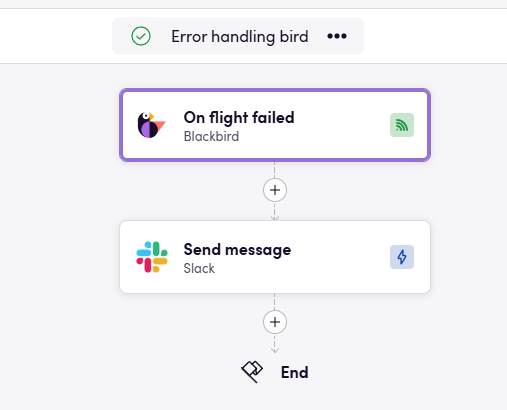
This incredibly simple Bird will send a notification in Slack when any Flight fails. This can be useful for alerting people about possible issues. An alternative, or suplementary action to Slack would be logging a ticket in f.e. Jira.
Feedback
Section titled “Feedback”Do you want to use this app or do you have feedback on our implementation? Reach out to us using the established channels or create an issue.