

Assets
You can try Blacklake today. Contact us if you want to participate.
This guide assumes you understand the Blacklake Key Features.
Blacklake can store more than aligned content. It can also store the linguistic assets that shape how content should be written and which terminology should be used. In the interface, these assets are currently managed as Style guides and Termbases.
Whenever Blacklake prepares content for downstream processing, these assets can be used to enrich the context. That means they are not just passive reference documents. They become structured inputs for translation, rewriting, generation, and other language workflows.
Style guides
Section titled “Style guides”Style guides are where you capture writing rules for a Lake.
Use them for instructions such as:
- voice and tone preferences
- punctuation and capitalization rules
- formatting conventions
- market- or language-specific writing behavior
- do and don’t guidance for translators, reviewers, or AI systems
You can create a style guide from the Style guides overview by giving it a name and optional description.
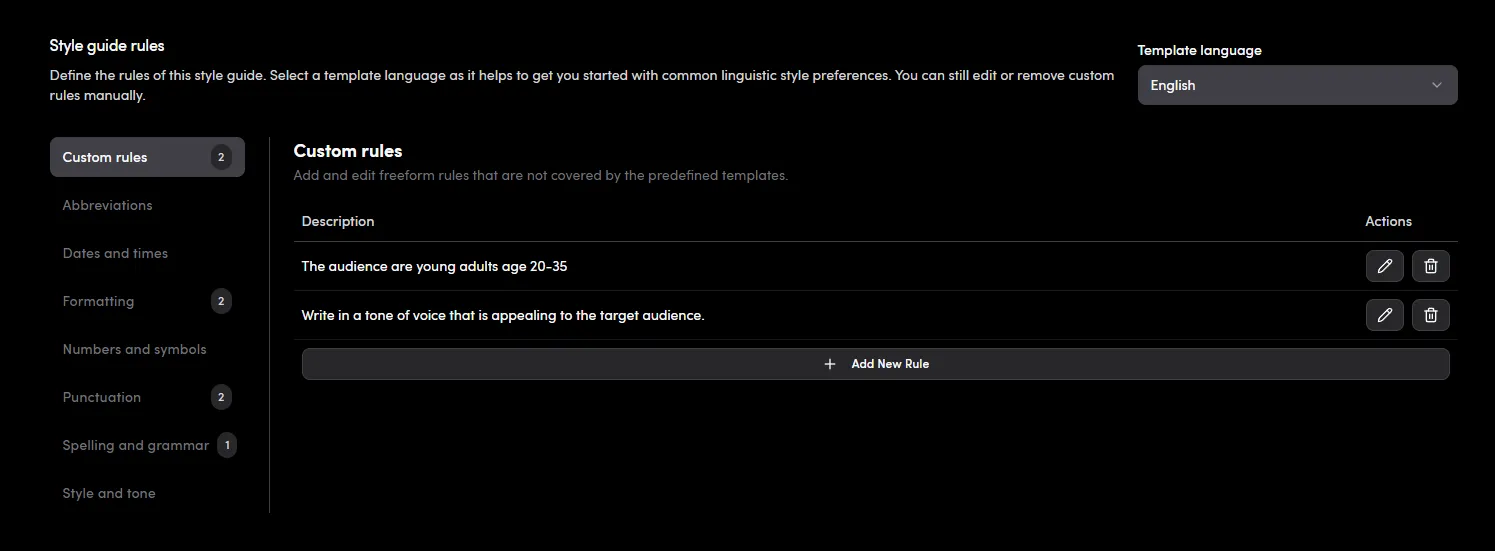
After opening a style guide, the main editor is split into two types of rules:
Custom rulesfor freeform instructions that you write yourself- template-based rule sections for common language-specific writing preferences
Template language
Section titled “Template language”Each style guide has a Template language.
This does not translate your rules automatically. Instead, it loads a predefined set of categories and common stylistic choices for that language so you can enable them quickly. Examples include formal vs. informal address, punctuation preferences, quote handling, and similar conventions depending on the selected language.
You can:
- switch the template language
- enable or disable predefined rules with checkboxes
- choose between predefined options when a rule has multiple possible variants
- combine template-driven rules with your own custom rules
If you change the template language, the previously enabled template rules are cleared and replaced by the new language’s template structure. Custom rules remain managed separately.
The template language is not necessarily the same as the style guide language. You can ignore the template language and create a style guide for your own language if it doesn’t appear in the template list.
Custom style rules
Section titled “Custom style rules”The Custom rules section is for instructions that do not fit the predefined templates or that are too specific to your brand, workflow, or audience.
You can:
- add a new freeform rule
- edit an existing custom rule
- delete a custom rule
This is the right place for guidance such as product naming conventions, brand tone nuances, or editorial constraints that are unique to your organization.
When to use style guides
Section titled “When to use style guides”Style guides are most useful when you want Blacklake to pass consistent writing behavior into downstream workflows. Instead of relying on a static PDF or wiki page that may be ignored, you can keep the rules inside the same system that already stores your content and context.
In practice, teams often create separate style guides for:
- brand-level writing rules
- language-specific conventions
- channel-specific guidance such as support vs. marketing
- regional or market variants
Termbases
Section titled “Termbases”Termbases are where you manage terminology across the variants in a Lake.
A termbase stores concepts and their terms per variant. This is important because terminology is rarely a one-to-one list of isolated words. One concept may have multiple approved, discouraged, or forbidden forms depending on language, market, or workflow.
From the Termbases overview, you can:
- create a new termbase manually
- import an existing termbase from a
.tbxfile - search existing termbases by name or description
Blacklake currently accepts .tbx files in TBX2 and TBX3 format for import.
Concepts and term groups
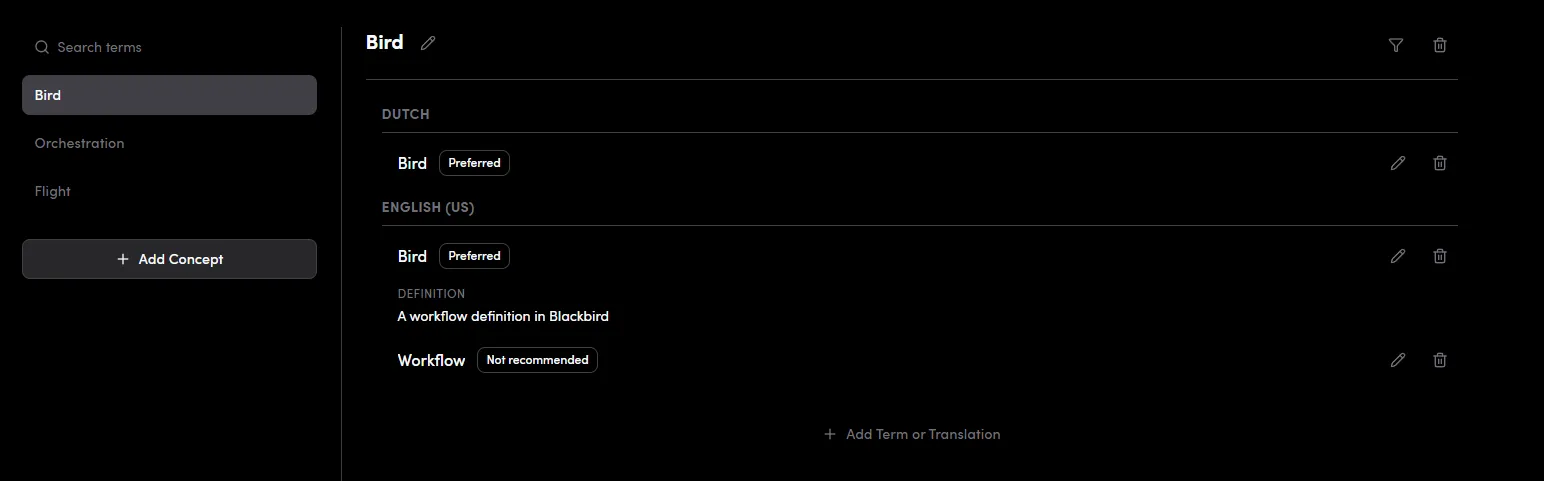
Section titled “Concepts and term groups”Inside a termbase, terms are organized into concept groups.
When you add a term without selecting an existing group, Blacklake creates a concept group for it. If you add another term or translation while viewing a concept, the new term is added to that same group.
This model lets you represent a concept once and then attach:
- a source term
- approved translations
- discouraged alternatives
- forbidden terms
- keyword-style preferred phrasing
The left sidebar in a termbase shows the available concept groups. Opening one displays all terms in that group, organized by variant.
Adding and editing terms
Section titled “Adding and editing terms”Each term entry belongs to a specific Variant, so termbase management depends on your Lake variants already being defined.
When adding a term, you provide:
VariantTermStatusDefinitionNotes
You can later edit or delete individual terms, rename the concept group, or delete the entire concept group.
Definitions and notes
Section titled “Definitions and notes”Blacklake treats Definition and Notes differently:
Definitionis added to the context when the term is leveragedNotesstay internal to the UI and are never added to the context
This is useful when you want explanatory guidance to travel with the terminology, while keeping operational comments or editor notes out of downstream prompts and workflows.
Term statuses
Section titled “Term statuses”Each term has a status that controls how it should be treated.
Acceptedmeans the term is a valid possible term or translation.Preferredmeans the term is valid and should be favored over accepted alternatives.Not recommendedmeans the term is in scope but should generally be avoided in favor of a better option.Keywordmarks terminology that should be used where possible. These are always added to the full context during preparation.Forbiddenmarks blocked terminology that should never be used. These are also always added to the full context during preparation.
This makes termbases useful not only for translation consistency, but also for SEO, compliance, and controlled language workflows.
Filtering and reviewing terminology
Section titled “Filtering and reviewing terminology”Within a concept group, Blacklake shows terms grouped by variant and lets you filter the view by variant. This is helpful when one concept spans many languages or locales and you want to inspect only a subset of the terminology.
If a termbase has no concepts yet, Blacklake shows an empty state with an option to add the first concept immediately.
How assets fit into Blacklake
Section titled “How assets fit into Blacklake”Style guides and termbases are part of the same broader idea: Blacklake stores the context around your content, not just the content itself.
That means you can use Blacklake to keep track of:
- how something should be written
- which terms should be used
- which terms must be avoided
- how those preferences vary by language or market
Together with content history, metadata, and Strategies, these assets help turn Prepare Content into a governed, context-rich operation instead of a basic lookup step.
Continue with the Strategies guide to see how Blacklake decides which content should be reused during preparation.