

Document360
Document360 is a knowledge base platform for building and publishing product documentation and help centers. Use this app to manage your knowledge base articles — create them, update translations, publish changes, and automate the translation workflow.
Getting started
Section titled “Getting started”You’ll need:
- A Document360 account with access to your knowledge base
- An API token — go to Settings > Knowledge base portal > API tokens in Document360 and create one for your project
- Your API hub URL — the default is
https://apihub.document360.io, orhttps://apihub.us.document360.ioif your knowledge base is in the United States
Connecting
Section titled “Connecting”- Search for Document360 in the Apps section
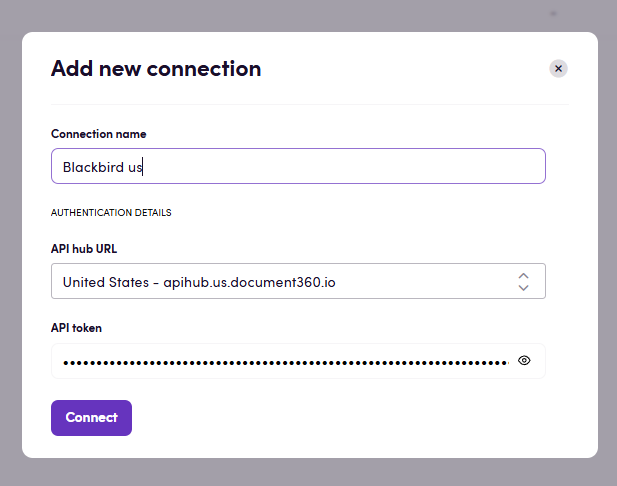
- Click Add connection
- Give it a name you’ll recognize (e.g., “Product knowledge base”)
- Enter your API hub URL and API token
- Click Connect
- Verify the connection successfully created
Actions
Section titled “Actions”Articles
Section titled “Articles”- Search articles — Find articles in your knowledge base. Filter by language, publication status, or when they were last changed.
- Create article — Add a new article. You can publish it right away or save it as a draft first.
- Get article info — See the full details of one article, including its title, status, translations, and any custom information.
- Download article — Export an article’s content as a file ready for translation. Pass it to any translation tool and then upload the result back.
- Update article — Change an article’s content, title, or other details. Perfect for uploading translated versions or making updates.
- Publish article — Make an article or translation go live on your knowledge base.
Workspaces
Section titled “Workspaces”- Search workspaces — See all versions of your knowledge base and which languages each one supports.
- Search workspace locales — View the languages available in a specific knowledge base version.
Custom fields
Section titled “Custom fields”- Search custom fields — Find any custom fields your knowledge base uses.
Events
Section titled “Events”- On articles created — Triggers when new articles are added to your knowledge base. You can filter by language, publication status, or visibility.
- On articles published — Triggers when articles are published or updated. You can filter by language or visibility.