

OpenLoc
OpenLoc is a translation management system for managing content, translation and review workflows.
Before Connecting
Section titled “Before Connecting”- Make sure you have access to an OpenLoc account and know the HTTPS hostname URL.
- Obtain an active access key from AI settings > Access keys in OpenLoc.
Connecting
Section titled “Connecting”- Navigate to apps and search for OpenLoc.
- Click Add Connection.
- Name your connection for future reference e.g. ‘My OpenLoc connection’.
- Enter API hostname: the HTTPS origin serving your OpenLoc API.
- Enter Access key: your active key from AI settings > Access keys.
- Save the connection and confirm that it appears in your connections.
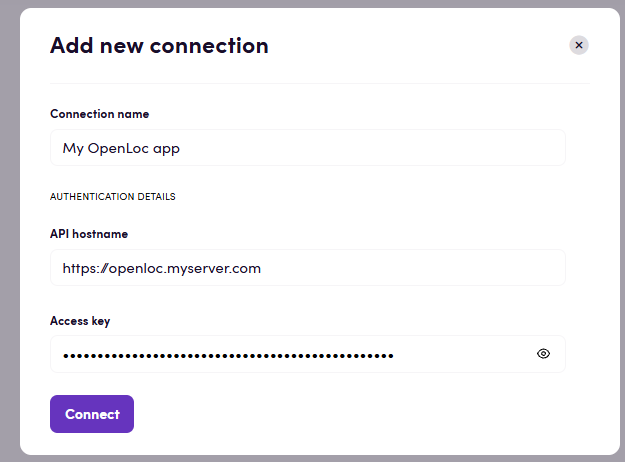
Actions
Section titled “Actions”Projects
Section titled “Projects”- Search projects Find all projects matching the selected filters.
- Get project Get the details of a selected project.
- Create project Create a translation project.
- Search jobs Find jobs in a project matching optional filters.
- Get job Get a job’s details, progress and current workflow step.
- Update job Change the user assigned to a job’s current workflow step.
- Download original file Download the original document exactly as it was uploaded.
- Upload file Upload a document and create its translation jobs, one per target language.
- Download translated file Download a translated document in its original format or as bilingual XLIFF 1.2.
Segments
Section titled “Segments”- Save draft translation Save translation text without approving it; the segment returns to needs review.
- Confirm segment translation Approve a translation and save it to the project’s writable translation memories.
- Add segment comment Add a comment to a translation segment.
- Search job segments Get source text and translations for all matching segments in a job.
Events
Section titled “Events”Projects
Section titled “Projects”- On project status changed Triggers when an existing project’s status changes, optionally to a selected status.
Feedback
Section titled “Feedback”Do you want to use this app or do you have feedback on our implementation? Reach out to us using the established channels or create an issue.